Sub-GHz signal analysis for Windows · freeBeta · Under active development
What is that remote actually sending?
Signal Visor opens a recording from 433, 868 or 315 MHz and reads it: where the transmissions are,
how long the pulses last, what the modulation is, which protocol it matches and what its fields say.
When nothing matches – the usual case with an unknown sensor – it lays the frames out side by
side so you can find the structure yourself.
Windows 10/11, 64-bit · works offline, on files from any receiver · no account, no telemetry
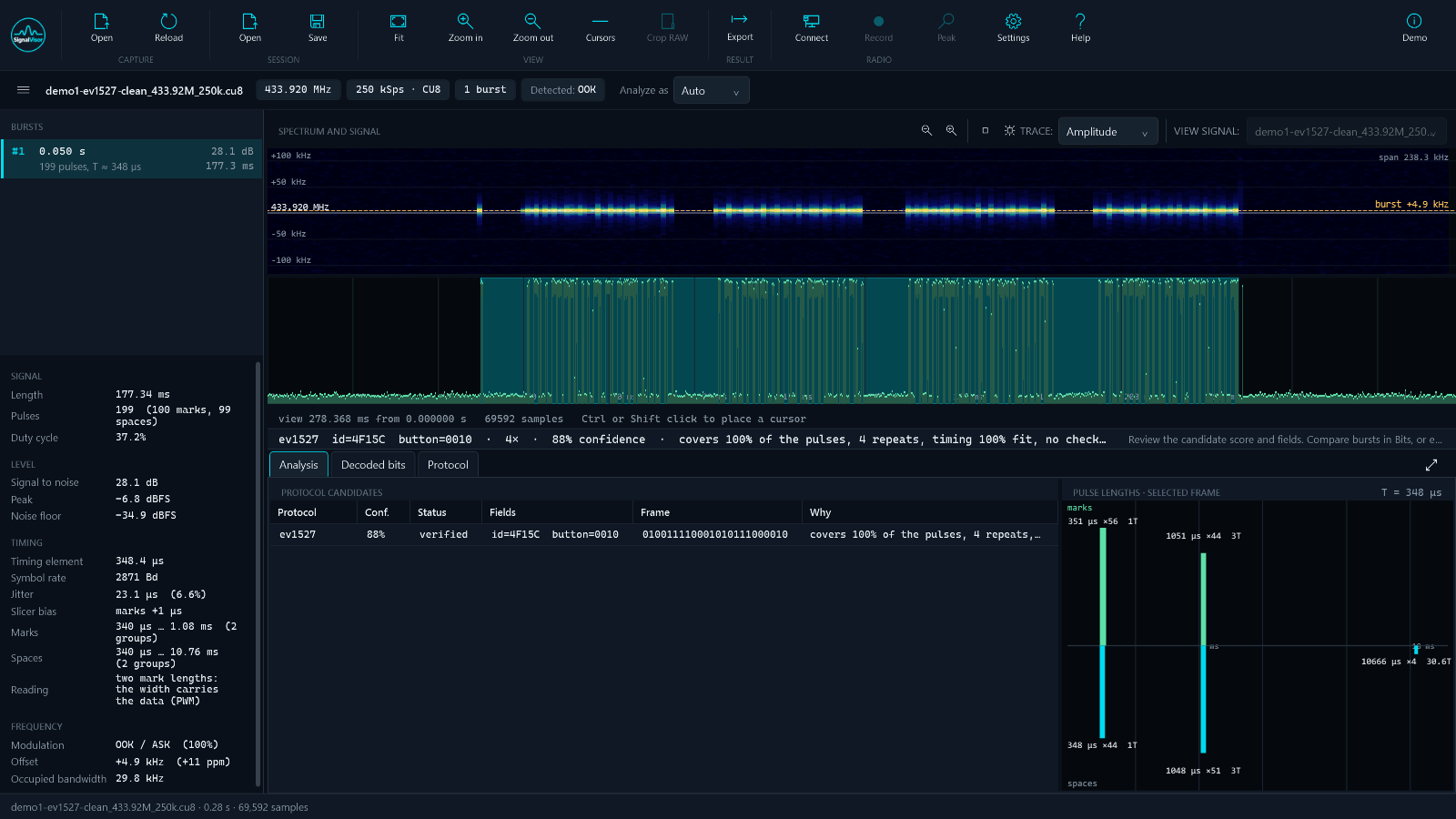
One of the demo recordings that ship with the program, generated rather than recorded: the
carrier in the spectrum, the pulse train under it, the protocol it reads as, and the pulse
lengths that show a 1 : 3 width code before any decoder runs. Click or tap the picture
for the full-size window.
What Signal Visor does
Analyze
From a recording to a reading
Finds the transmissions in a recording and measures each one: length, timing, jitter, frequency offset
Decides the modulation from the signal, not from the file name – OOK/ASK, 2-FSK, 4-FSK, PSK, an unmodulated carrier – and lets you overrule it, with a frequency view to check
Reads the pulse-length histogram, which shows the coding before any decoder runs
Ranks the protocols that fit and says why each one scored what it did
Bits
When nothing matches
Frames stacked one above another, with the positions that change marked
Several recordings in one comparison – one button press per file, labelled
Name a field, give it a scale, and read it as a number across every frame
Checksum search over the usual CRC-8, CRC-16, XOR and SUM variants
Exports
The result goes somewhere
The point of recognising a device is to hand it to something else: an
rtl_433 flex decoder line, ESPHome raw or
rc_switch YAML, an RCSwitch protocol entry for Arduino, a
Flipper Zero.sub to replay, a CSV of every pulse, and PNGs of
the plots for documentation.
Protocols
Definitions you can read and fix
Every protocol is a small JSON file with a schema, not code: timing, coding, frame layout,
fields and a checksum. Your own definitions go in your own folder and override the built-in
ones, so a fix needs no new release. The Protocol workspace edits them with a live preview
against the open recording.
A decoder that is sure of itself is easy to write and easy to be wrong with. A short frame
without a checksum cannot be told from noise, and a reading that is internally consistent can
still be wrong end to end – this program found exactly that in one of its own protocols,
and only a second, independent reading of the same signal settled it.
So Signal Visor shows its working. Every candidate carries a confidence and a sentence saying
what it is made of. A definition is draft until a real
recording has verified it, and a draft is ranked accordingly. Where a figure is an estimate
rather than a measurement, it says so.
What it opens, and what it needs
Recordings
IQ files: .cu8, .cs8, .cs16, .cf32,
.iq, .complex, .sigmf-data
Flipper Zero .sub RAW – pulse timings, no amplitude
Ten minutes at 2 MSps opens in about three seconds and is never held in memory whole
Radios
Files from any receiver: RTL-SDR, HackRF, Pluto, anything that writes IQ
Live recording from an ADALM-Pluto / Pluto+, a HackRF One or an RTL-SDR – see the
manual
Lost samples are detected and reported, not silently recorded as signal
A live spectrum monitor is the next stage
What it deliberately does not do
It does not transmit, and it does not help with rolling codes. Opening a car or an alarm is
not an engineering problem this tool is interested in; reading your own sensor is.
 Sub-GHz signal analysis for Windows · free
Beta · Under active development